 |
|
|
|
Certification

- I'm Online Chat Now
Portable 5CH 12G SDI Fiber Transmission Kits With 1GB Network
Product Details:
Payment & Shipping Terms:
|




Detailed Product Description
| Product Name: | Fiber Camera System | Fiber Connector: | ST |
|---|---|---|---|
| Fiber Type: | Single Fiber Single Mode | Wavelength: | 1270nm/1330nm |
| Package: | Netural | Warranty: | 3 Years |
Portable 5CH 12G SDI Fiber Transmission Kits With 1GB Network
Function
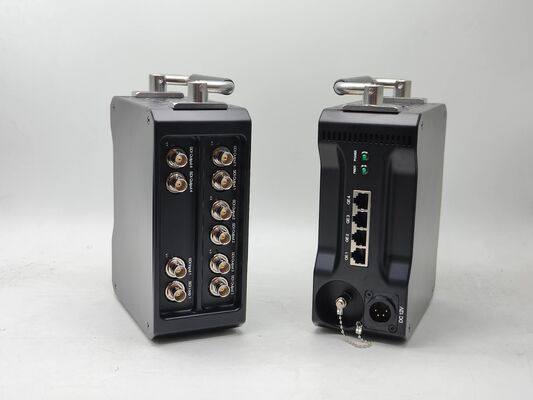
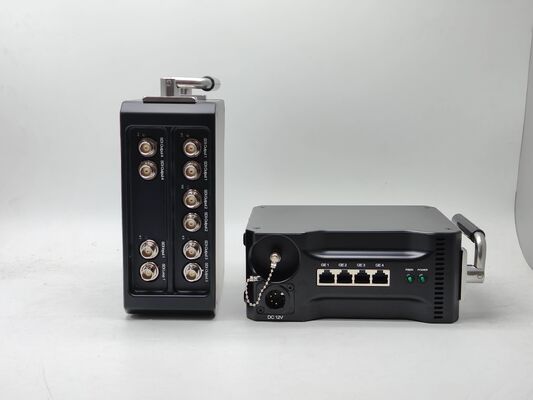
Portable Customize Fiber Optic Converter:
4x 12G SDI Out
1x 12G SDI In
4x GbE BiDirectional Ethernet ( 1GbE shared)
12V Power Supply with 4-Pin XLR Connector
ST Fiber Connector
Features
Technical Characteristics
1. Supports ST-2082-1 (12G), ST-2081-1 (6G), ST-424 (3G), ST-292 (HD) and ST-259 (SD);
compatible with DVB-ASI and AES10 (MADI);
2. Clock recovery function; (the clock restorer weakens high-frequency jitter and uses pure low-jitter clocks to regenerate data completely);
3. The clock restorer is locked to 11.88Gb ps, 5.94Gb ps, 2.97Gb ps, 1.4 85Gb ps or 1.001 fractional sub-rate and 270Mbps SMPTE rate;
4. The signal input has an automatic cable equalization (EQ) function, and the output has a drive (CD) function;
5. Support plug-in SFP optic modules, which can be replaced according to the actual needs of the site and different distances or interfaces corresponding optic modules; Support single-mode single fiber/dual-fiber transmission distance 10KM (default);
6. Support status light display;
7. Support a wide voltage 9-18V power supply, power plug with lock to prevent falling off during operation;
8. Plug and play, no debugging;
Optic Characteristics
Wavelength: 1310nm (single mode dual fiber), 1270nm/1330nm (single mode single fiber)
Fiber type: 9/125um single mode
Rate: 12Gbps
Transmitter power: 0~-3dB
Receiver sensitivity: -12dB
Fiber connector: ST
Transmission distance: single-mode fiber, 10KM
Wavelength: 1310nm (single mode dual fiber), 1270nm/1330nm (single mode single fiber)
Fiber type: 9/125um single mode
Rate: 12Gbps
Transmitter power: 0~-3dB
Receiver sensitivity: -12dB
Fiber connector: ST
Transmission distance: single-mode fiber, 10KM
Pictures

Application
Broadcasting Video Transmission
High Quality HD-SDI Video Monitoring in Traffic Operation (ITS)
High Quality Images METRO Security
Avionic Surveillance System
Oil & Gas Perimeter Intruder
Connection Diagram
Reminder
1. It is recommended to use the short optical fiber link for the first time to ensure that all the functions of the equipment are normal, and then do long-distance transmission
2. The signal of the fiber optic converter can be output to the power amplifier, but the audio source of the power amplifier can not be output the audio source signal to the fiber optic converter, otherwise the equipment will be burned
Troubleshooting of the indicator
1: Power indicator is abnormal (POWER)
Answer: Check whether the power adapter meets the equipment requirements or the power adapter fails
Whether the socket is not tight or loose
2: Fiber indicator is abnormal (FIBER)
Answer: Check whether the optical fiber interface is loose and not plugged in
Check whether the optical fiber is too attenuated
3: Video indicator is abnormal (VIDEO)
Answer: Check the signal source
Replace the video cable
4: Data indicator is abnormal (DATA)
Answer: Check the COM port, whether the baud rate is consistent
Check whether the serial port cable is connected backward
Attention
Lightning protection, static electricity, and grounding:
It is recommended that when installing the device, consideration should be given to the impact of grounding by lightning and prevention measures. Strong static electricity will damage the optical device and data chip in the equipment. It is recommended that when plugging/unplugging the data port of the optical converter, please disconnect the power supply of the optical converter first.
Fiber and optical components:
Be careful when plugging the optical fiber, as the optical components of the optical converter are very fragile, and you should avoid causing damage to the optical components. It should be noted that the light source produced by the optical components of the optical converter will be harmful to the eyes, so do not have direct eye contact with the optical components ofthe optical converter. If you need to detect the optical power of the optical converter, please use the optical power meter.
Equipment and installation procedures:
1. Optical fiber installation: Please carefully insert the optical fiber into the optical fiber interface of the optical terminal after confirming that the optical fiber link meets the installation requirements.
2. Equipment installation: The equipment can be distinguished between transmitter and receiver, and it is stated clearly on the label and printed on the chassis of the equipment.
Packaging & Shipping
Payment
Welcome to inquire!
Ho-Link Technology Co., Ltd
Contact Information
Company Information
Ho-link Technology Co., Limited is a leading manufacturer of fiber optic transmission products in China. We manufacture a full range of fiber optic transmission products, from Media converters, Video converters, to Optical transceivers and POE switches. Besides, we provide OEM/ODM service for many famous companies in the Telecom industry all over the world.
Every month, we can turn out 10,0000 units of the above products. Before production, our raw materials are checked again to make sure they are compliant with RoHS Directives. And all our output is CE and FCC-marked, finding good markets in many countries and regions, including United Kingdom, Spain, Italy, Poland, Turkey, US, Canada, Brazil, Australia, Indonesia, Singapore, Malaysia, Vietnam, and India.
Welcome to source high-quality products at competitive prices from us.
Contact Details
Ho-link Technology Co., Limited
Contact Person: Ms. Lisa Xiao
Tel: +86 15118060653
Fax: 86-755-26407582
Other Products
-
1U Rack 4K EFP To Fiber Camera Systems For Live Event With Base Station Control
-
4 in 1 EFP 12G-SDI Video to Camera Fiber Optic Transmission System With 4pcs Transmitter and 1pc Rack CCU
-
4K SDI Extender over Fiber, EFP Camera Systems, Base Station Control
-
CCU Control EFP To Fiber Camera Systems, 12G SDI With Local Loop Out, PGM Video Return, Remote Control
-
Rack-mount Chassis 4K SDI So-ny Camera Fiber Transmission System, Fibre Camera Adaptor + Fibre Base Station
-
SMPTE 4K 12G-SDI Fiber Transmission System With PGM Video Return